PowerSMS
FAQ
Frequently Asked Questions
-
Can you explain the price, trial period, upgrade policy etc.?
Price is $9.95. You can download a 14-day trial (the trial has no restrictions). If you purchase a license after 14 days, simply enter the serial number into the app and keep using it (nothing to uninstall or reinstall). Registered users will get free upgrades for at least 1 year.
-
Which phones does PowerSMS support?
PowerSMS currently supports all Windows Mobile® 5 and 6.x phones. This includes both “Pocket PC” and “Smartphone” devices, which are also known as “Professional” and “Standard” Edition.
-
Does PowerSMS replace the built-in Messaging application?
No, PowerSMS does not replace anything. It works with your existing messages and folders. The automated messages sent by PowerSMS will also show up in your “Sent Items” folder, so you can treat them just like any other SMS.
-
I just installed PowerSMS but don’t know how to start it. Where should I look for it?
Once installed, the PowerSMS icon will appear in your Start menu.
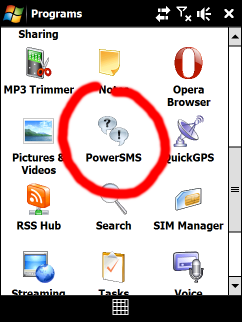
-
Can I just launch PowerSMS from within the Messaging application?
No, currently you can only launch PowerSMS from the Start menu.
-
Do I have to keep PowerSMS running in the background for the Auto Reply and scheduled SMS features to work?
No, you can safely exit PowerSMS after configuring it. It does not have to be running in the background. The system will automatically launch and terminate PowerSMS as needed.
-
Can you explain what the various Auto Reply settings mean?
Starting with PowerSMS version 1.3, Auto Reply can be on one of these “modes”: On, Off and Automatic. On means Auto Reply is turned on and watching for missed calls. Off means Auto Reply is turned off. Automatic means Auto Reply will automatically turn on or off based on your Calendar. When your Calendar has an appointment marked Busy, Auto Reply will turn on. When there are no appointments, or appointments marked as Free, Tentative or Out Of Office, Auto Reply will turn off.
-
How can I tell PowerSMS to only Auto Reply missed calls that are from mobile numbers?
(I don’t want it to send text messages to land line phones)This happens automatically. By default PowerSMS will only Auto Reply missed calls that are from known Contacts, and that match the mobile phone number of the Contact. All other missed calls (i.e. from work/home numbers, unknown numbers etc.) are ignored. You can change this setting by selecting Menu > Options in the Auto Reply dialog box.
Please note: If you mistakenly stored a land line number in the mobile number field of a contact, PowerSMS has no way of knowing it’s a land line. In this scenario, it will still attempt to Auto Reply.
-
Group SMS does not seem to be working on my Palm Treo. It only sends the SMS to 1
person instead of the whole group.This is a known issue that only applies to Palm Treo devices because they use a proprietary SMS application. PowerSMS is designed to work with the Messaging application that comes built into Windows Mobile. Since Palm uses a custom SMS application, some features such as Group SMS don’t work as expected. We’re hoping to find a workaround and will try to fix this in upcoming releases if possible.
-
When selecting contacts, PowerSMS only shows a few of the contacts I have on my device. Why doesn’t it show the rest?
Since PowerSMS is created for text messaging purposes, it will only show you those contacts that have a valid mobile phone number. You may not have entered the mobile number for certain contacts. Those won’t be visible. Also, PowerSMS does not currently work with contacts stored on the SIM card. We are hoping to fix this limitation in an upcoming version.
-
Does PowerSMS work if installed on a storage card?
Most people that have installed PowerSMS on a storage card have reported no issues
so far. However, some people have mentioned that scheduled messages sometimes don’t
go through. We haven’t been able to consistently reproduce these issues. The problem
is fixed if the app is installed into main memory. Since PowerSMS is a very small
app (~150Kb) we recommend avoiding storage cards. -
How does the Cool Stats feature work so fast? Is there a process running in
the background indexing all my messages?No, once you exit PowerSMS nothing runs in the background. Cool Stats is totally
non-intrusive and works only when you’re actively using it. The reason your messages
are analyzed so quickly is highly optimized code and some performance tricks, which
are our “secret sauce”.